Every admission conversation at Code Academy ends with the same question: “What will I actually be able to build?”
It is the right question. A course outline full of logos tells you very little. What matters is what you can do, on your own, when the course is over — and whether you can explain it to someone who is about to hire you.
So here is the honest answer, stage by stage.
The short version
Our Full-Stack Web Development programme is 16 weeks, taught in a batch, with around 10 hours of work a week. You attend live sessions, practise with recorded lessons, submit assignments that a mentor actually reviews, and finish with a capstone project that is deployed on the internet and written up as a portfolio case study.
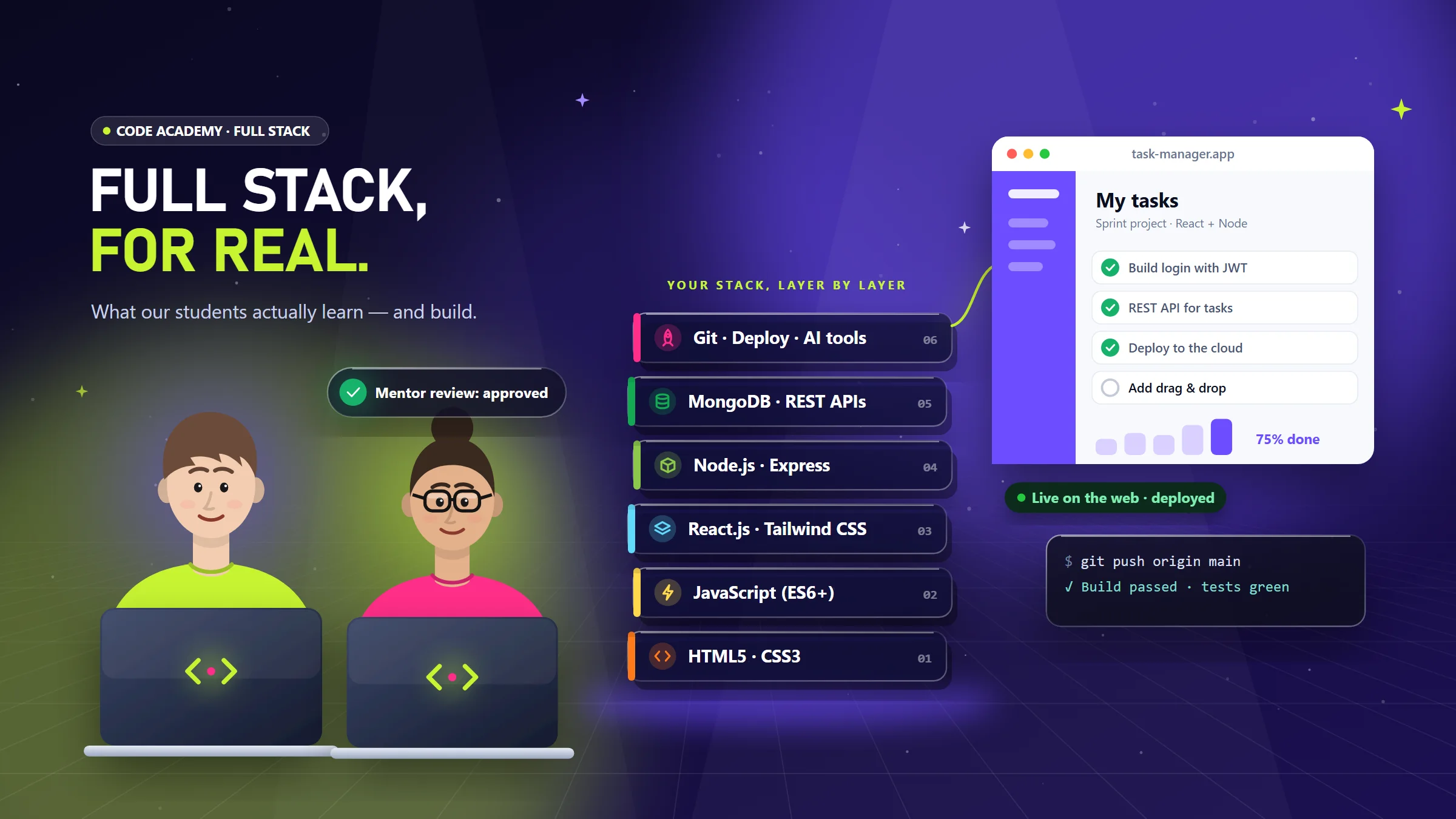
The stack is the one most web teams use today: HTML5, CSS3, JavaScript, React.js, Tailwind CSS, Node.js, Express and MongoDB, with Git, GitHub, deployment and AI-assisted development woven through the whole course.
Stage 1 — The web, properly
We start slower than most people expect, because this is where bad habits begin.
- Semantic HTML5 — headings, landmarks, forms and why screen readers care.
- CSS3 layout — Flexbox for one direction, Grid for two, and when to use which.
- Responsive design — mobile first, fluid type, images that do not break layouts.
- Tailwind CSS essentials — utility-first styling once you understand the CSS underneath it.
You build: a responsive landing page from a written brief, the way a client would send it.
Stage 2 — JavaScript that isn't copy-paste
Modern JavaScript (ES6+) is where students either click or quit, so we slow down again.
- Variables, functions, arrays and objects — until they feel boring.
- The DOM and events — making pages respond to people.
- Async JavaScript and
fetch— talking to real APIs. - Debugging with DevTools instead of guessing.
You build: an interactive app (a quiz or task tracker) that saves data in the browser.
Stage 3 — UI/UX for developers
Developers who understand design ship better software. Not prettier — better.
- User flows and wireframes before code.
- Figma for developers: reading a design, inspecting spacing, exporting assets.
- Design systems and accessibility: consistent spacing, colour contrast, keyboard use, and the loading, empty and error states nobody draws.
Stage 4 — Frontend with React.js
- Components, props and state — thinking in pieces.
- Hooks, effects and data fetching.
- Routing and forms, with validation that helps users instead of scolding them.
- Styling React with Tailwind CSS and modern component patterns.
You build: a multi-page React app that consumes a real REST API.
Stage 5 — Backend with Node.js, Express and MongoDB
This is where “web designer” becomes “full-stack developer”.
router.post('/api/tasks', requireAuth, async (req, res) => {
  const task = await Task.create({ ...req.body, owner: req.user.id });
  res.status(201).json(task);
});- REST API design: resources, status codes, pagination.
- MongoDB and data modelling — documents, collections, relationships.
- Authentication with JWT, validation and error handling.
- Keeping secrets out of your code with environment variables.
You build: the API behind your React app, with login and protected routes.
Stage 6 — Git, GitHub and deployment
Code that only runs on your laptop does not count. Students learn to work like a team: branches, pull requests, code review and a clean commit history. Then they deploy — frontend and backend — with environment variables and a custom domain.
Stage 7 — AI-assisted development, the right way
AI coding assistants are part of every modern workflow, so we teach them openly: explaining errors, generating tests, refactoring and reviewing. We also teach vibe coding — describing what you want and iterating with an AI — for quick prototypes.
The rule is simple and non-negotiable: you must be able to explain every line you submit. Mentors ask.
The capstone: what “real-world” means
The capstone is not a tutorial clone. You get a brief with constraints, plan it in short sprints, get your code reviewed, present a demo and publish a case study. It is the project you will talk about in interviews.
How we know learning actually happened
- Assignments reviewed by mentors with marks and written feedback.
- Checkpoint quizzes at the end of key modules.
- Attendance tracked for every session.
- A career-readiness score built from progress, grades, quizzes, attendance, portfolio and certificates — visible to the student, not hidden in a spreadsheet.
- A verifiable certificate: anyone can check it on our verification page.
Strong students are recommended by their mentors for internships at the LogicGigs software house — which is exactly why we care so much about how they learn.
Who it's for
You need a laptop with at least 8 GB of RAM, comfort using a computer, and about 10 hours a week. You do not need any previous programming experience.
Ready to see the full curriculum? Explore the Full-Stack Web Development course or talk to us about the next batch.